

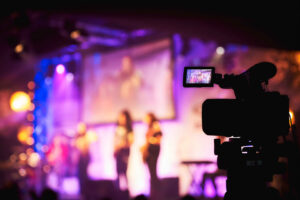
Who Can Film and Live Stream Your Company Conference in London?
Clownfish Events films and live streams company conferences across London.
Cameras, sound, slides and stream, run by one in-house team.
Trusted by Google, Amazon, Netflix, Spotify and Lloyds


Conference filming and live streaming
from one London team
Clownfish Events provides conference filming and live streaming across London, with the AV, cameras and stream run by one in-house team. It suits companies running town halls, AGMs, sales conferences and multi-day events, with colleagues watching from other offices or at home.
Our video engineers handle the camera positions, the sound feed, the presentation feed and the stream itself, then record and edit the sessions you need afterwards. See our conference AV production and event video production services for the full setup.
The short version: our conference AV packages start from £5,250 excluding VAT for 100 guests and £8,700 excluding VAT for 200, covering sound, screens, lighting and our team. Conference filming and live streaming are added to the package and quoted on the cameras, crew and editing you need. You decide who is watching and what you want afterwards, and our team handles the technical side on the day.
Clownfish Events at a glance
Here’s what you get when Clownfish handles your conference filming and live streaming.
| Company | Key specialisation | Best for | What we bring |
|---|---|---|---|
| Clownfish Events | Conference AV production, filming, live streaming and editing | Company conferences, town halls, AGMs, product launches and awards nights in London | Owned cameras and AV equipment, in-house video engineers and one team running sound, screens and stream |
Clownfish Events
We’ve been producing corporate events for 17 years. We bring our own cameras and AV equipment, maintained by our team, and our engineers stay on site to run the cameras, screens and stream from setup to pack-down.
Your proposal sets out the site visit, production plan, crew and agreed recordings and edits, so you know what you’re getting before the day.
One team for AV,
cameras and stream
We plan your conference filming and live streaming as part of the AV production, so the cameras, sound and screens come from one team working to one plan. Nothing falls between suppliers on the day, and you have one person to call.
It starts with who is watching. A stream for employees across several offices needs reliability and readable slides, a recording for your intranet needs full sessions with clean sound, and a highlights film needs a camera operator looking for moments and reactions. You tell us which matter, and we plan the cameras and crew around them.
Our team sets camera positions at the site visit, around your stage, screens and seating. Most single-stage conferences use a wide shot and an operated camera on the speaker, with an audience camera added when questions and reactions matter to the people watching online.

Private streaming to Teams,
Zoom or your own platform
We stream to Microsoft Teams, Zoom, YouTube or a private platform. Results, strategy updates and anything commercially sensitive can be streamed to a platform behind your company login, such as a Teams town hall or a Zoom webinar. We work with your IT team to configure sign-in and access restrictions for your intended audience.
Your IT team usually controls the company account, so we work with them early to set up the event and test the link before the day.
Remote delegates can take part through Q&A, chat or live polls, with a moderator on your side passing questions to the stage. Remote speakers join through our vision mixer, so they appear on the big screens and on the stream.

Speakers, slides and sound
that work online
Our video team manages the presentation feed, taking slides directly from the presentation laptop, so remote delegates see sharp, readable slides alongside the speaker. The director switches between the speaker, full-screen slides or both side by side as each session needs.
Sound for the stream comes straight from our sound desk, so people watching online hear every microphone clearly. We provide roving microphones for audience questions, and recorded messages or remote speakers play to the room and the stream at the same time.
We agree a deadline for final slides with you. Any changes after that go through our production team, so they are checked before they appear on screen.

A tested connection and
a backup plan
Venue Wi-Fi is shared with every delegate’s phone and laptop, so we ask the venue for a dedicated wired connection for the stream and check its upload speed at the site visit.
Where the venue allows it, we agree a backup connection so the stream can switch over if the main line fails. Where recording is in the scope, sessions are also recorded locally, so the content is still there to share afterwards.
Our engineers monitor the stream throughout the day and respond quickly if a problem appears.

Recordings and edits agreed
before the day
We agree what you want afterwards before the event, whether that’s full session recordings for your intranet, short clips for internal comms or a highlights film of the day. Each needs different shots, so the camera team knows what to collect.
Depending on the agreed scope, we record each session alongside the live stream and record cameras separately for a cleaner edit. The turnaround and who signs off the edit are agreed in the quote.
Our guide to repurposing event footage covers how to get more from the recordings once the conference is over.

When is Clownfish the right fit?
Clownfish is the right fit for conference filming and live streaming when you want the conference, the stream and the recordings handled by one team, so your own people can focus on the speakers and the content.
Our conference AV production team designs the sound, lighting, screens, cameras and stream together. If you need the venue, schedule and running of the whole event, our corporate event management team can take that on too. For a wider view, see what a conference production company does, or our guide to planning a multi-day company conference.
Read our satisfaction guarantee for the commitment behind our delivery.
Conference filming and live streaming:
your questions answered
Who can handle filming, live streaming and AV for our company conference in London?
Clownfish Events can run all three as one production. Our in-house team plans and runs the sound, screens, cameras and live stream together, so camera positions, the sound feed and the slides are planned around your stage from the first site visit.
How much does conference filming and live streaming cost?
Filming and live streaming are added to a conference AV package and quoted on the number of cameras and operators, the streaming platform, the days covered and the editing you need. Our conference AV packages, which include sound, screens, lighting and our team, start from £5,250 excluding VAT for 100 guests and £8,700 excluding VAT for 200 guests.
What should a conference filming and live streaming quote include?
Check that it lists the cameras and operators, the vision mixer and director, the sound feed to the stream, how slides reach the stream, the streaming platform, the internet connection and any backup, which sessions are recorded, editing and turnaround, and the setup and rehearsal time.
Can we live stream our conference privately to employees across different offices?
Yes. We can stream to a platform behind your company login, such as Microsoft Teams or Zoom, or to a private streaming platform. We work with your IT team to configure sign-in and access restrictions for your intended audience, and you decide whether the recording is shared afterwards.
Can remote delegates see the speakers and presentation slides together?
Yes. Our video team takes the slides directly from the presentation laptop into the vision mixer, so the director can show the speaker and slides side by side, switch to full-screen slides for detailed charts or cut to the speaker on camera.
Can you work with our venue’s existing AV and internet connection?
Often, yes. We check the venue’s screens, sound system and internet at the site visit and use what works. For the stream, we ask for a dedicated wired connection and test its upload speed before the day. Our guide to venue AV vs external AV production explains how to compare the two.
How do you keep the broadcast running if the venue’s internet fails?
We plan for it before the day, with a dedicated wired line for the stream and a backup connection where the venue allows it. Where recording is part of the scope, sessions are also recorded locally, so the content can still be shared afterwards if the stream drops.
Can we get edited session recordings and a highlights film afterwards?
Yes. We can edit full session recordings for your intranet, short clips for internal comms and a highlights film of the day. Tell us what you need before the event, so the camera team captures the right shots.

Written by
Ellie Perrett
Account Manager
Ellie joined Clownfish in July 2024, bringing years of events experience and a Hospitality Management degree from Surrey. She believes corporate events should be fun, turning the “same old” into grown-up playgrounds that get adults giggling because when people feel good, everything else is easy.
Outside work, Ellie enjoys cooking, working out and honing her wine-tasting skills. Her favourite Clownfish kit is Mario Kart, and her potato of choice? A beef-dripping triple-cooked chip with peppercorn sauce.
Ready to talk through your conference?
Our conference AV production team plans your conference filming and live streaming around your venue and your audience. Tell us your date, venue and who needs to watch, and we’ll show you how we’d run it.
